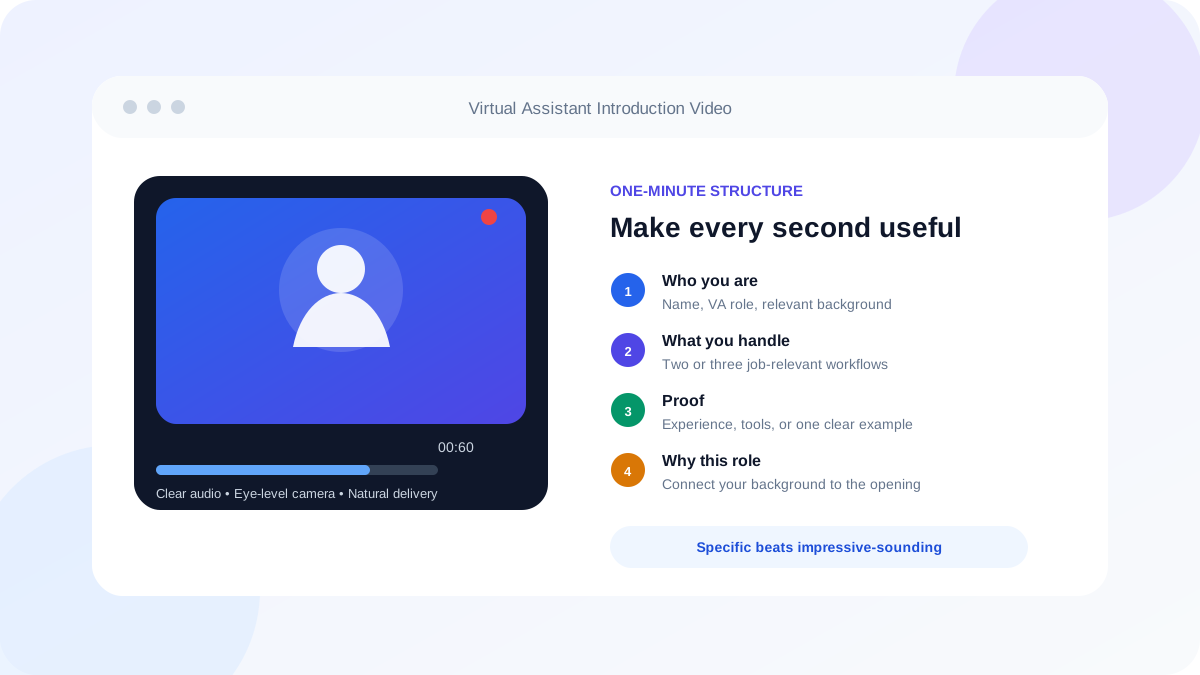
In this guide
Use these scripts as frameworks, not claims to copy. Your introduction video should reflect your real experience, skills, tools, availability, and communication style. Do not invent clients, results, certifications, software expertise, or years of experience.
Create a strong Virtual Assistant introduction video with 1-minute scripts, beginner and niche examples, recording tips, common mistakes, and a checklist.
What matters most
- Keep most VA introduction videos between 30 and 60 seconds unless the employer gives a different instruction.
- Lead with your role and relevant experience, then prove fit with specific tasks, tools, or work examples.
- Beginners should use transferable experience and practice projects instead of pretending to have paid VA clients.
- Customize the script to the actual job so the employer can hear why your background matches their needs.
- Record for clarity, not cinematic production. Clean audio, good lighting, eye-level framing, and natural delivery are enough.
Why employers ask for a Virtual Assistant introduction video
A Virtual Assistant introduction video gives an employer information that a resume or profile cannot show as quickly. They can hear how clearly you communicate, see whether you can explain your experience without reading a long biography, and decide whether your professional style fits a client-facing or team-facing role.
The video is not a talent show and it is not a substitute for your resume. Its job is to make the employer want to keep evaluating you. Current remote job listings sometimes ask applicants to submit a short or one-minute introduction video as part of the application, so preparing one strong version can save time when you apply.
The strongest videos are specific. Instead of saying you are hardworking, reliable, and passionate, explain what type of VA you are, which workflows you have handled, which tools you know, and what kind of role you are looking for.
How long should a VA introduction video be?
If the employer gives a time limit, follow it exactly. If no length is provided, 30 to 60 seconds is a useful target for a first introduction. Upwork's current guidance for profile introduction videos also recommends communicating the main points in roughly that range.
One minute is long enough to show role fit and communication quality without turning the video into a full interview answer. If your script needs two or three minutes to explain who you are, it is probably trying to cover too much.
- 30 seconds: enough for a role, one proof point, and a short close.
- 45 seconds: useful when you need to mention two or three relevant workflows.
- 60 seconds: a practical default for job applications asking for an introduction video.
- Longer than 60 seconds: use only when the employer asks for more detail or specific questions.
The best 60-second Virtual Assistant introduction structure
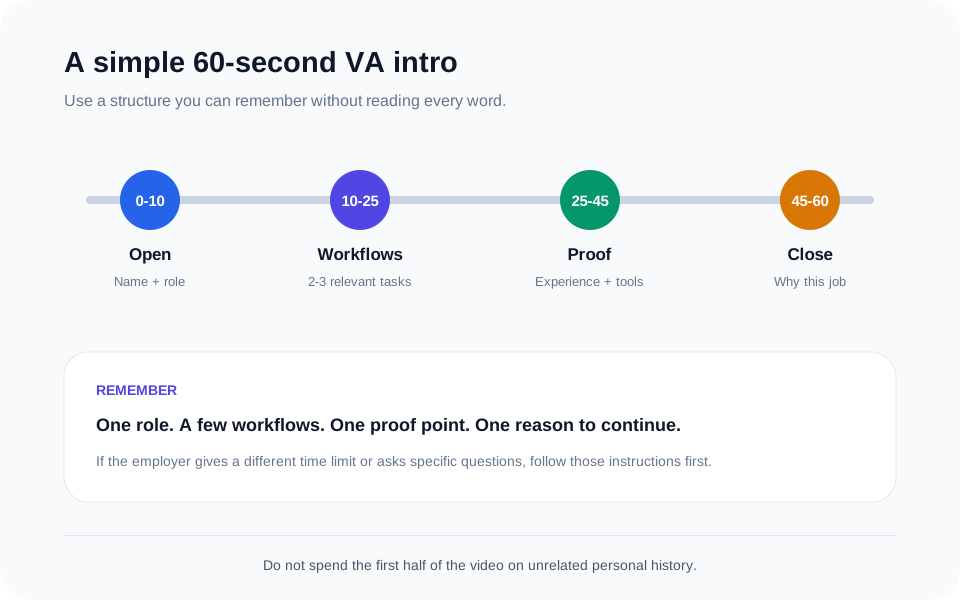
A simple structure is easier to remember than a word-for-word speech. Think in four blocks: who you are, what you do, proof that you can do it, and why this opportunity fits.
The timings below are not strict. They are there to stop one section from taking over the whole video.
| Time | What to cover | Example |
|---|---|---|
| 0-10 seconds | Name, target role, and relevant background | Hi, I'm Mia. I'm an Administrative Virtual Assistant with three years of office and customer support experience. |
| 10-25 seconds | Two or three workflows you can handle | I support inboxes, calendars, spreadsheets, CRM updates, and customer follow-up. |
| 25-45 seconds | Relevant proof, tools, or experience | In my previous role I maintained weekly reports, scheduled appointments, and handled customer email using Google Workspace and HubSpot. |
| 45-60 seconds | Connect your fit to the opening and close | I'm looking for a long-term admin role where I can keep recurring work organized and communicate clearly with the team. Thank you for considering my application. |
A simple Virtual Assistant introduction video script template
Use this as a framework and replace every placeholder with information that is true for you.
Script template: Hi, I'm [name]. I'm a [type of Virtual Assistant or professional background] with experience in [relevant area]. I help with [two or three specific workflows]. I have worked with [relevant tools, systems, or industries], and one example of my experience is [short proof point]. I'm interested in this role because [specific reason connected to the job]. I would be happy to bring that experience to your team. Thank you for considering my application.
The important part is the proof point. Even one concrete detail such as maintaining a CRM, preparing weekly reports, scheduling patient appointments, or publishing WordPress content makes the introduction more credible than a list of personality adjectives.
Virtual Assistant introduction video sample for beginners with no VA experience
You do not need to say that you have years of VA experience if you are starting out. Use relevant experience from office work, BPO roles, school projects, internships, volunteering, training, or realistic practice projects.
Sample script: Hi, I'm Angela. I'm starting my career as an Administrative Virtual Assistant, and my previous experience is in customer service and office support. I have worked with email communication, data entry, appointment scheduling, spreadsheets, and customer records. I am comfortable with Google Workspace, Microsoft Office, and Canva, and I have been practicing remote admin workflows such as inbox organization and task tracking. I'm looking for an entry-level VA role where I can apply those skills and continue building strong remote-work experience. Thank you for considering my application.
That introduction is stronger than saying you have no experience and then apologizing for it. It shows the employer what you already know how to do.
Administrative Virtual Assistant introduction video example
Sample script: Hi, I'm Nicole. I'm an Administrative Virtual Assistant with three years of experience supporting scheduling, email, reporting, document preparation, and customer follow-up. I regularly use Google Workspace, Microsoft Excel, Slack, and ClickUp to keep recurring tasks organized. In my previous role I maintained weekly reports and coordinated appointments for a busy service team. I'm interested in this position because it matches the kind of structured admin work I do best. Thank you for reviewing my application.
Notice that the script is not a list of twenty admin tasks. It gives the employer a clear role, a few relevant workflows, tool context, and one useful proof point.
Executive Virtual Assistant introduction video example
Sample script: Hi, I'm Camille. I'm an Executive Virtual Assistant with experience supporting founders and senior managers with complex calendars, inbox triage, meeting preparation, travel research, and follow-up. I work with Google Workspace, Microsoft 365, Slack, Zoom, and ClickUp, and I am used to keeping priorities visible while protecting confidential information. I'm interested in this role because it combines executive coordination with the kind of proactive follow-through I have handled in previous positions. Thank you for considering me.
For executive roles, the useful signal is judgment. Mention work that shows prioritization, confidentiality, stakeholder communication, or follow-through instead of only saying that you know how to use a calendar.
Customer Support Virtual Assistant introduction video example
Sample script: Hi, I'm Jen. I'm a Customer Support Virtual Assistant with four years of experience handling email, chat, customer records, order questions, and issue escalation. I have worked with CRM and ticketing systems and I am comfortable following response procedures while documenting each customer interaction clearly. I enjoy roles where I can solve routine issues quickly and know when something needs to be escalated. I'm interested in this position because it matches my background in written customer support and remote communication.
If the opening is phone-heavy, mention your call experience honestly. If it is mainly email or chat, focus on written communication and support workflows instead.
SEO Virtual Assistant introduction video example
Sample script: Hi, I'm Mark. I'm an SEO Virtual Assistant focused on WordPress publishing, on-page SEO, keyword research, internal linking, and Search Console reporting. I have experience updating title tags and meta descriptions, formatting content, checking live pages, and preparing SEO reports in Google Sheets. I am comfortable with WordPress, Google Search Console, Semrush, and Screaming Frog. I'm interested in this role because it combines content execution with the technical QA work I already handle. Thank you for considering my application.
SEO employers usually need more than tool names. Mention the kind of work you performed inside the tools and how you checked the final output.
Bookkeeping Virtual Assistant introduction video example
Sample script: Hi, I'm Bea. I'm a Bookkeeping Virtual Assistant with experience supporting invoicing, expense tracking, reconciliations, accounts receivable follow-up, and month-end preparation. I am comfortable with spreadsheets and bookkeeping systems such as Xero and QuickBooks, and I keep unresolved items documented so they can be reviewed properly. I'm interested in this opportunity because it matches my background in organized financial administration and recurring bookkeeping support.
Do not claim to be an accountant or tax professional unless that is genuinely your qualification. A bookkeeping introduction should make your administrative and bookkeeping scope clear.
Real Estate Virtual Assistant introduction video example
Sample script: Hi, I'm Lara. I'm a Real Estate Virtual Assistant with experience supporting CRM updates, lead follow-up, appointment scheduling, listing administration, and transaction checklists. I am comfortable working with structured follow-up queues and keeping client and property records current across multiple systems. I'm interested in this role because it combines CRM discipline with the fast follow-up and coordination work I enjoy.
For real estate openings, mention the CRM, property platform, or transaction workflow if you have genuinely used it. If you have not, focus on transferable CRM, scheduling, customer support, or database experience rather than pretending.
Medical Virtual Assistant introduction video example
Sample script: Hi, I'm Anne. I'm a Medical Administrative Virtual Assistant with experience supporting appointment scheduling, referral follow-up, patient reminders, records coordination, and other non-clinical administrative workflows. I am comfortable working with structured procedures, protecting sensitive information, and escalating clinical questions to the appropriate staff. I'm interested in this role because it matches my experience in organized patient administration and professional communication.
Keep the introduction inside your actual scope. Administrative experience does not make someone a clinician, and a video should never suggest that you can provide medical judgment if the role is administrative.
How to customize your introduction video for a specific VA job
A reusable base script is useful, but sending the exact same recording to every employer can make your application feel generic. If an employer asks for a video specifically for their opening, customize at least the role, workflows, proof point, and reason for applying.
Start with the job description and highlight the five or six responsibilities that appear most important. Then choose only the two or three that you can support with real evidence. Your video should sound like an answer to this job, not a general advertisement for everything you have ever done.
- Identify the role the employer is actually hiring for.
- Choose two or three responsibilities that match your real experience.
- Mention one relevant tool or system only when it strengthens the match.
- Add one proof point from previous work or a clearly labelled practice project.
- Explain why this particular role interests you in one sentence.
- Remove anything that does not help the employer evaluate the opening.
How to record a professional VA introduction video at home
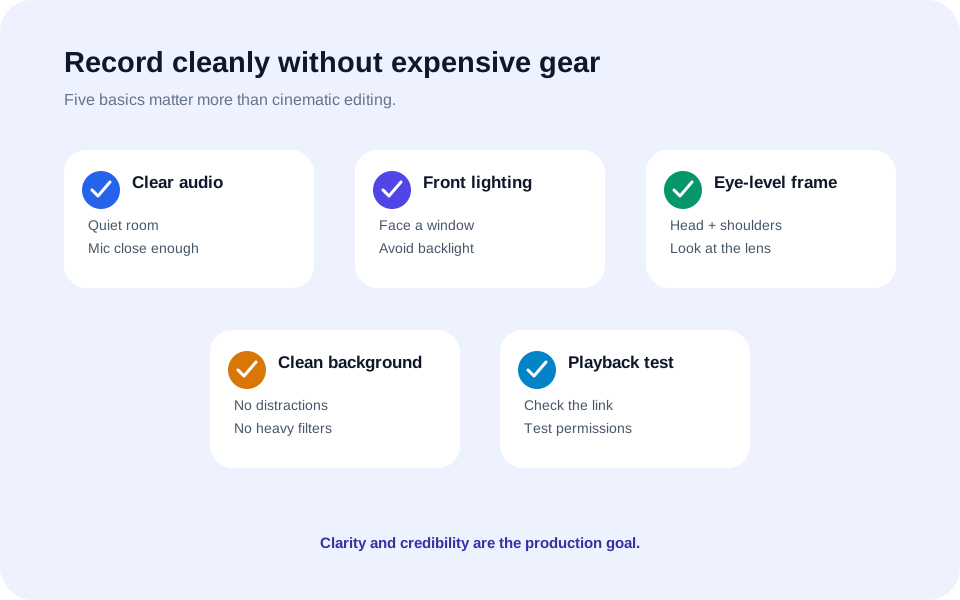
You do not need a studio, DSLR camera, or complicated editing. A modern phone or laptop webcam can be enough when the basics are handled well.
Clear audio matters more than fancy visuals. Record in a quiet room, move closer to the microphone if the sound is thin, and listen to the recording before submitting it. Face a window or soft light instead of sitting with a bright window behind you.
Place the camera close to eye level. Frame your head and shoulders, keep the background clean, and avoid filters that change your appearance or make the video look less professional.
- Use a quiet room and test the microphone first.
- Face a window or soft light so your face is easy to see.
- Put the camera near eye level instead of looking down at a laptop.
- Use a clean, non-distracting background.
- Wear something appropriate for the role and company.
- Record in landscape or portrait only if the employer specifies a format.
- Check the final file or link from another device before submitting it.
Should you read a script during your introduction video?
Write a script, but do not make the final recording sound like you are reading a document. The easiest method is to learn the structure rather than memorize every word.
Keep short cue words near the camera: role, workflows, proof, why this job, close. Record a few takes until you can explain those points naturally. Small pauses are fine. Perfect delivery is less important than sounding clear and credible.
If you need notes, place them close to the camera so your eyes are not constantly moving to the side. Avoid reading a full paragraph from another screen.
Common Virtual Assistant introduction video mistakes
Most weak videos are not weak because of camera quality. They are weak because they make the employer work too hard to understand the candidate.
- Spending the first 20 seconds on age, hometown, hobbies, or personal history that does not affect the role.
- Listing every tool you have ever opened instead of explaining one or two relevant workflows.
- Using generic claims such as hardworking, passionate, dedicated, and fast learner without evidence.
- Reading the script word for word with no eye contact.
- Recording in a noisy room or with a bright window directly behind you.
- Submitting a three-minute autobiography when the employer asked for one minute.
- Talking about skills that are not connected to the job description.
- Inventing clients, metrics, certifications, or years of experience.
- Forgetting to test the video link or file permissions before sending it.
What not to include in a VA introduction video
An introduction video should contain enough information to evaluate your professional fit, not every detail about your personal life. Avoid unnecessary sensitive information and do not share private details simply because you think an employer expects them.
You also do not need to explain every career gap, every reason you left a previous employer, or your entire work history. Those topics can be discussed later if they are relevant. Use the introduction to make your strongest job-related evidence clear.
- Passwords, account details, IDs, or private client information.
- Confidential screenshots or documents from previous employers.
- Unverified claims about results or clients.
- Long explanations about unrelated personal circumstances.
- Negative comments about previous employers or clients.
- Personal information the employer did not request and does not need to evaluate the role.
One-minute Virtual Assistant introduction video checklist
Before you submit the video, watch it once as if you were the recruiter. Within the first few seconds, you should be able to identify the candidate's role. By the end, you should know what the person can do, what evidence supports it, and why the role makes sense for them.
- My name and target VA role are clear in the opening.
- I mention two or three responsibilities that match the job.
- I include at least one real proof point.
- Any tools I mention are tools I can discuss honestly in an interview.
- My reason for applying is specific enough to sound intentional.
- The video is within the requested time limit.
- My voice is easy to hear and the lighting is clear.
- I look toward the camera instead of reading from another screen.
- I removed unsupported claims and unnecessary personal information.
- I tested the final video link, access permissions, and playback.
What to do after you record your VA introduction
Your video should support the rest of your application, not contradict it. Make sure the role you describe in the video matches your profile, resume, portfolio, and the jobs you are applying for.
If your profile still says you are a general VA while your strongest evidence is clearly in bookkeeping, SEO, executive support, or another specialty, fix the positioning before sending more applications. A consistent application is easier for a recruiter to evaluate.
Then keep one good general introduction as a base version and record a customized version when an employer asks specific questions or when the role is important enough to justify a tailored application.
Frequently asked questions
What should I say in a Virtual Assistant introduction video?
Say who you are, the type of Virtual Assistant role you are targeting, two or three relevant workflows you can handle, one short proof point, the tools or systems that genuinely matter, and why the specific opportunity fits your background.
How long should a Virtual Assistant introduction video be?
Follow the employer's instruction first. If no length is given, around 30 to 60 seconds is a practical target for a first introduction because it is long enough to show role fit without becoming a full interview answer.
How do I make a VA introduction video with no experience?
Use transferable experience from office work, customer service, school, internships, volunteering, training, or realistic practice projects. Be clear that you are starting your VA career and explain the tasks and tools you already know instead of inventing paid client experience.
Should I memorize my Virtual Assistant introduction script?
You do not need to memorize every word. Learn the structure and key points, then record several takes until the delivery sounds natural. Short cue words near the camera usually work better than reading a full paragraph.
Can I use the same introduction video for every VA application?
A reusable base video is useful, but customize it when an employer asks for a video specifically for their job. Change the role, relevant workflows, proof point, and reason for applying so the introduction matches the opening.
What equipment do I need for a VA introduction video?
A phone or laptop camera can be enough. Prioritize clear audio, good front lighting, eye-level framing, a quiet room, and a clean background. Expensive camera equipment is not required for a professional application video.
Should I mention my tools in a Virtual Assistant introduction?
Mention tools when they help prove fit for the role, but avoid reciting a long software list. It is stronger to say what you did with a tool, such as maintaining CRM records in HubSpot or publishing optimized content in WordPress.
Should I mention my expected salary or hourly rate in the video?
Only mention compensation if the employer specifically asks you to address it in the introduction. Otherwise, use the limited time to explain role fit, relevant experience, and the work you can handle.
Do I need to edit my VA introduction video?
Basic trimming is fine, but heavy editing is usually unnecessary. A clean single take with clear audio and lighting can work well. The employer is normally evaluating communication and fit, not video-production skill unless the job itself involves video editing.
What makes a Virtual Assistant introduction video stand out?
Specificity makes it stronger. A clear role, relevant tasks, one credible proof point, natural communication, and a direct connection to the job are more useful than generic confidence claims or an elaborate video production.
Useful next reads
Sources and further reading
For legal, compliance, tax, health, and employment questions, check the current official guidance that applies to your situation.
- Upwork: How To Add a Profile Introduction Video + Script Samples
- OnlineJobs.ph: Real Estate Virtual Assistant application requiring a short 1-minute introduction video
- OnlineJobs.ph: Virtual Assistant application requiring a 1-minute introduction video